
In this article, we’ll share 10 hand-picked color palettes along with HEX codes, best-use cases, real website examples, and a step-by-step approach to choosing the perfect color scheme for your WordPress site.
What is a Website Color Scheme?
A website color scheme is a thoughtfully selected set of colors used across a website to create a consistent, attractive visual experience. It includes primary, secondary, and accent colors applied to backgrounds, typography, buttons, and other UI elements.
These colors work together to reflect your brand identity, influence user emotions, and improve usability.
Why Are Color Schemes Important for website?
A website’s color scheme is more than just decoration — it’s a powerful communication tool that shapes how users feel, perceive your brand, and take action. Here’s how:
1.Brand Identity
Colors are deeply tied to branding. Think of red for Coca-Cola or blue for Facebook. A consistent scheme builds instant recognition and trust.
2.User Experience
Colors help guide users — drawing attention to buttons, forms, or headlines. Good contrast and balance improve readability and reduce eye strain.
3.Emotional Impact
Different colors trigger different emotions. For example:
- Blue = trust and calm
- Red = energy and urgency
- Green = nature and health
Your palette sets the tone before a word is read.
4. Engagement & Conversion
A smartly chosen accent color can increase clicks, form submissions, and sales. Even small tweaks can significantly boost conversion rates.
How to Choose and Implement a Website Color Scheme
Choosing the right color scheme isn’t just about preference — it’s a strategic decision that should reflect your brand’s purpose and appeal to your audience. Here’s how to do it:
1. Define Your Brand Personality
Is your brand fun and youthful? Elegant and luxurious? Eco-conscious and natural?
Choose colors that reflect those values and emotions.
| Brand Type | Suggested Colors |
|---|---|
| Modern & Tech | Blue, white, gray |
| Luxury & Fashion | Black, gold, deep purple |
| Organic & Natural | Green, brown, cream |
| Fun & Youthful | Pink, orange, teal |
2. Understand Your Target Audience
Different age groups, cultures, and industries respond to colors differently.
- Younger audiences may prefer bright or pastel tones.
- Corporate users may favor muted, neutral tones.
- Global brands should avoid cultural color conflicts (e.g., white = mourning in some countries).
3. Learn Basic Color Theory
Know how to combine colors effectively using:
- Complementary Colors: Opposites on the color wheel — high contrast (e.g., blue & orange)
- Analogous Colors: Next to each other — harmonious (e.g., blue, teal, green)
- Triadic Colors: Evenly spaced — vibrant and balanced (e.g., red, yellow, blue)
Use tools like:
4. Choose 2–3 Core Colors
Use the 60–30–10 Rule for visual balance:
- 60% – Dominant (backgrounds, sections)
- 30% – Secondary (menus, sidebars)
- 10% – Accent (buttons, links, highlights)
5. Apply Colors in WordPress
- Theme Customizer: Go to Appearance > Customize > Colors
- Elementor: Set global colors in Site Settings > Theme Style
- Block Themes: Use FSE (Full Site Editing) to manage color presets site-wide
6. Keep It Consistent
Use your color scheme consistently across:
- Header & footer
- Navigation menus
- Buttons & links
- Forms & CTAs
- Backgrounds & typography
This builds visual trust and strengthens your brand identity.
Website Color Trends 2025
The latest color palettes shaping modern WordPress and website designs.
1. Soft Green & Ivory – Sustainable & Light

Colors: Emerald green (#4CAF50), ivory (#FAF5E9)
Used by: Mandai Wildlife
Description:
Perfect for eco-friendly or organic brands. Green symbolizes growth and nature, and paired with ivory, it feels open and breathable—ideal for environmentally conscious websites and NGOs.
2. Color Gradient + White & Dark Blue — Innovative & Sleek
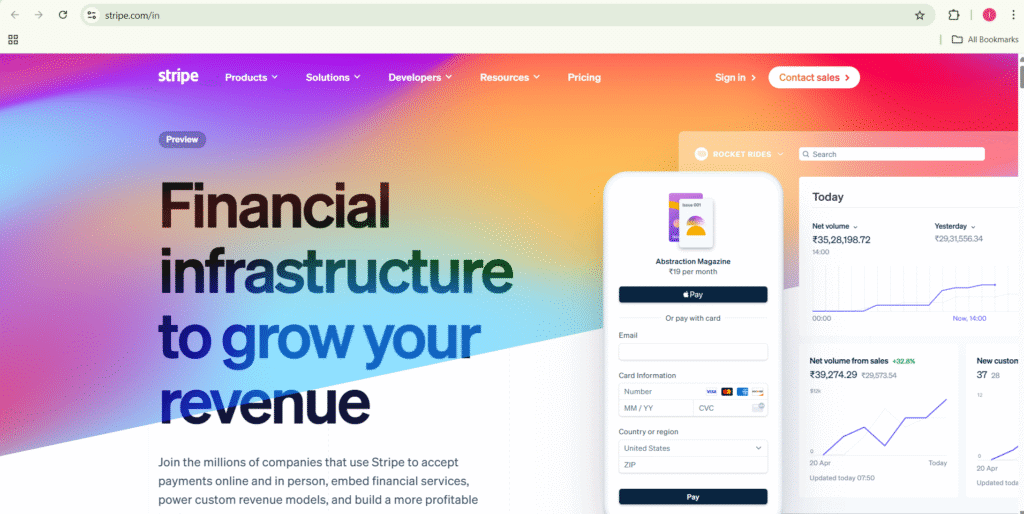
Colors: F8F8F9, #111439, gradient overlay
Used by: Stripe
Description: Stripe’s color scheme blends clean white, deep navy, and a modern gradient to reflect innovation and fintech professionalism.
3.Coral & Cream — Uplifting & Personal

Colors: #FF6B6B (Coral Red), #FDF2E9 (Old Lace)
Used by: Teachable
Description: A friendly coral and cream palette that feels personal and uplifting — perfect for creators selling courses.
4.Cerulean Blue + Light Blue

Colors: #0288D1 (Cerulean Blue), #E1F5FE (Light Blue)
Used by: WebMD
Description: Clean blues that inspire trust and clarity—typical for medical and health information sites.
5.Charcoal + Green

Colors: #24292E (Charcoal), #28A745 (Green)
Used by: GitHub
Description: Dark mode coupled with green accents highlights code clarity and community action.
6.Orange and yellow

Colors: Orange (#FF921C), yellow (#ECA427)
Used by: Hot Box Pretzels
Description: The website for Hot Box Pretzels uses a color scheme of orange and yellow to create a warm, inviting, and appetizing look.
7. Pink-Orange Gradient and White

Colors: #FF4E50 (Bright Pink), #F00094 (Deep Pink), #FF6600 (Orange), #FFFFFF (White), #1A1A1A (Charcoal)
Used by: Melonleaf.com
Description: A bold and energetic gradient theme that combines bright pink and orange with clean white backgrounds and dark charcoal text. This scheme creates strong visual interest while maintaining readability—perfect for tech service companies aiming to look both modern and approachable.
Conclusion:
Choosing the right website color scheme is essential for creating a strong brand identity, enhancing user experience, and driving engagement. By selecting colors that resonate with your industry and audience, you can communicate your brand’s values effectively and make your site visually appealing and memorable. Use these proven color palettes and tips to design a WordPress website that stands out in 2025 and beyond.
Related Articles:
How to Setup RankMath SEO Plugin for WordPress site
Reference: